
By User10961
September 18, 2026, 1:41 am
Indexable Face Mill WOC values are wrong
New user here. 10+ year user of Gwizard, but the license server went down on me the other day, so here I am.
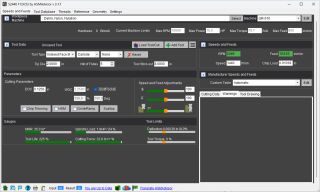
Setting up my first tool, we use a 2" diameter face mill, 5 inserts, on a 6" extension. I plugged all that in. Set my DoC to .125, WoC to 80%, and low and behold it says that is 1.800". It should be 1.600". So I checked the "Slot/Pocket" box and it goes to 2.25". Screenshot attached.
Why is it mathing for a 2.25" diameter cutter when I input 2.00"? Screenshot attached.

Screenshot 2026-09-17 212853.png
Eldar Gerfanov (Admin)
Hello,
Please click the chevron icon on the Tool Data panel header to expand additional details about your tool, such as the lead angle. You can also switch to the Tool Drawing view in the results panel on the right to visualize the tool geometry.
For face mills, the tool diameter is measured at the tip. Therefore, the Effective Diameter will vary based on the tool's lead angle and your depth of cut.
In HSMAdvisor, milling tools generally use the tip diameter where practical. The exception is High-Feed mills, where the defined diameter represents the outer diameter of the tool.
Please let me know if this helps clarify things!
Best regards,