January 15, 2014, 3:43 am by Eldar Gerfanov (Admin)
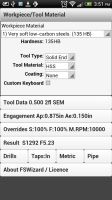
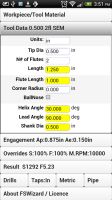
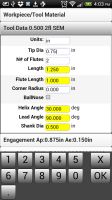
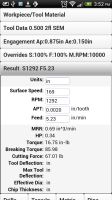
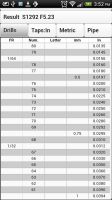
After almost 2 months since the last release the next update has just been uploaded to the google Play Store.
Version 1.32 follows in the footsteps of the HSMAdvisor.
It now too has latest material definitions and an updated custom material drop-down list.
This list now expands to the size of the screen overriding default Samsung's scroller (that they stole from iPhone).
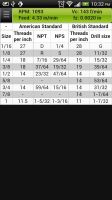
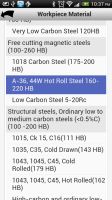
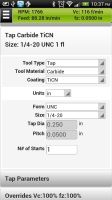
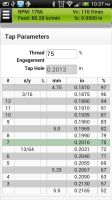
Biggest update yet is a new Tap and Form Tap tool types. You can now get not only cutting speed and feedrate for taps, but also calculate the best drill size for desired thread percentage.
January 12, 2014, 8:47 pm by Eldar Gerfanov (Admin)
Hello guys,
I have just uploaded a newest update to HSMAdvisor v0.702.
One of the users reported several problems over this weekend and i have just fixed them.
I strongly encourage anyone who has downloaded previous version to download and install this update.
It adds UN thread type and fixes "strange" cutting speeds for stainless steels and fixes graphcal bugs caused by "Larger font size" settings on your desktop.
Also i have reset all trial counters, so that anyone who still does not have a license has another 30 days to try my software!
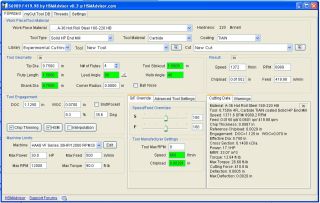
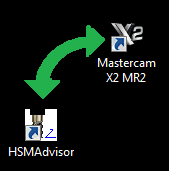
One of the most requested features in HSMAdvisor has long been integration with various CAD/CAM solutions available on the market.
There are two possible ways of achieving said task.
First way: using CAD/CAM API to create plugins to enable HSMAdvisor to "talk to" various software packages. This road could produce the best results, however implementing it would be laborous and results not always very convinient to use. Also developer(me) would have to create plugins for many dozens of cad/cam software packages. Muliply that by the fact that with each CADCAM release, a new version of plugin would need to be produced, tested and debugged. This work is for a whole software department and would call for a product far more expensive than what a lot of my customers could afford.
Second way: Grab tool, speed and feed data directly from the CAD/CAM window, process it and then update required information when the calculation is done. This solution is easyer to implement and could prove to be the most convinient for user as well.
Need i tell you that i have chosen to go the easy way?
Without further delay let me introduce the first Speed and Feed calculator that can be integrated with a CAD/CAM solution by a user himself!
This is How it Works
Step One: User launches CAD/CAM solution. We will use MasterCAM x2 in our case.
A toolpath is programmed the usual way, a proper tool is selected and when it is time to enter your speed and feed data you launch HSMAdvisor.
October 12, 2013, 4:32 pm by Eldar Gerfanov (Admin)
Lately there have been a lot of really interesting HSM topics on PracticalMachinist forums.
In one of them a guy who owns his own resharpening business posted a video of his endmill milling a block of D2 hardened to over 60 RC. The forum topic is located here First try on D2 62Rc(video)
Here is his post so you know what we are talking about:
Quote:
In an effort to perfect our speeds and feeds while hardmilling, this is the first try. Its not right yet, but far from a failure. I apologize for the language at the end, but I do not edit my videos. The endmill was a reground garr VRX at .353 diameter. Parameters were 750 sfm, .018 radial, .300 axial and .004 ipt. The next run will be at 650 sfm, .006 ipt using a mist sprayer. Also, any small areas will be blocked off to be ran at lower speeds to allow cooling time for the cutter. Just a note for anyone using a Mag Fadal, The E-stop button is not quick enough, use feed hold. The endmill was badly worn on the corners, but not broken, and will be resharpened and used again.
In the ensuing discussion i posted my own take on how and why HSM works
Quote:
HSM works in many ways.
1) Reduced cutting time per edge per revolution allows it to cool down more. 2) Chip thinning allows to increase chipload (advancement per tooth per revolution) 3) Increased depth of cut combined with shallow radial positively affects deflection. Tool bends less as it is more rigid towards the tool holder. 4) Higher cutting speed actually reduces cutting forces as heat generated in the cutting zone makes it easier to shear off a layer of metal. Yet because the time of contact is so small, most of the heat is carried away with the chip. 5) Higher RPM also allows to get rid of hot chips faster thus further reducing heat transferred to the tool. 6) Higher feedrate actually reduces relative cutting speed. 7) At high axial engagements more than one flute is in contact with the workpiece at different points along the axis of the tool. This too helps combat vibrations and chatter. 8) You are using more of the tool than just its tip, so technically you can do more work with one tool before it gets dull. 9) lastly it looks cool as hell and is very impressive. Whenever we know visitors or bosses are coming we try to make sure some HSM is going on even if application does not merit that I am not sure if the air that is moved by the endmill is doing much, but i suspect he didn't mean exactly that.
September 10, 2013, 10:00 pm by Eldar Gerfanov (Admin)
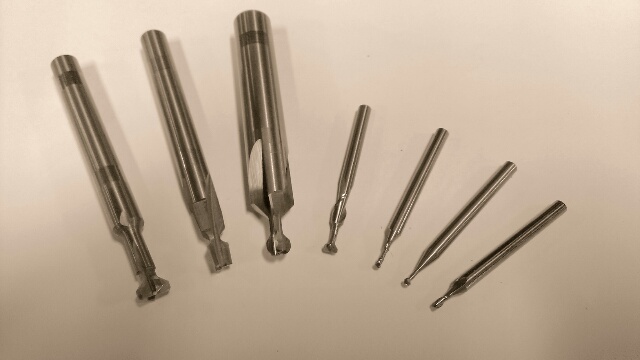
If you are working in mold-making, prototyping or even in a job shop you have had to use unusual form tooling before in your life.
Form tooling is often used to machine undercuts and other features on regular 3 axis machines that would otherwise require a multi axis machining centre or are not machinable o at all.
The classical example of a form tool is a tear-drop ball mil, also known as a "lollipop". It has a tip with a certain diameter and a much smaller shank that produces enough clearance to machine undercuts on straight walls. It can also be used to regular surface finishing and 2d milling.
Another example is a T-slot cutter that is used to produce key-ways and t- slots
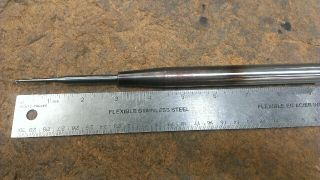
The main thing to consider when machining with reduced shank end mils is deflection and torque.
While deflection is especially dangerous for long tools, torque becomes much more important for tools with severely reduced shank.
Torque required to break a tool is directly proportional to the diameter of its shank.
And when shank diameter is much smaller than the tip diameter it does not matter how short that weak portion is: unless you compensate for it you will snap the tool.
The first thing that crosses the mind in many such cases is "I gotta run this tool very slow". It may take forever, but in many cases job gets somewhat done.
Contrary to that many experienced machinists have been proponents of different approach. Instead of reducing feed rate to the point of rubbing and below, it is much more productive to reduce cutter engagement if possible and leave feed rate settings largely unchanged.
Trying to keep proper chip load is even more important when machining work-hardenable materials like stainless steel and titanium. In those cases rubbing is not just unproductive, it leads to a very premature, in many cases instantaneous tool failure.
Just how much of a cut is possible to take in each particular case is the black magic that separates beginners from seasoned pros.
We all have manufacturer speed & feed charts and have used their recommendations.
But sometimes those charts just don't apply.
For example manufacturer charts assume you are using their endmills at a certain stickout length, flute length and at a certain depth of cut.
But in the real life you rarely match all these conditions. Sometimes you need to use longer endmill. Sometimes your flute is longer than what manufacturer gave you speeds and feed for.
What i am trying to say is that whenever your real life conditions differ from "normal" you "need to adjust accordingly". In fact this is what is printed below many charts.
Too bad not many sources tell you how and what to adjust.
While failure to adjust cutting parameters often leads to chatter, poor surface finish and even tool breakage, one of the biggest mistakes people do when machining is
Note: Certain HSMAdvisor Licenses Include FSWizard PRO For Android for Free!! Check out our HSMAdvisor Web Storefor Details
Absolutely the best handheld CNC machinist's speed and feed calculator around. Calculate cutting conditions simply by choosing your work and tool material. No need to know any numbers. FSWizard will automatically use recommended cutting speed and chipload.
* Made by a machinist for machinists *
Improve productivity and optimize cutter life.
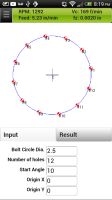
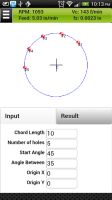
* Milling, Drilling, Tapping and Turning * Suggests optimum cutting depth and balances cutting parameters. * Supports Chip thinning and HSM machining. * Required Power estimation, Recommended Depth/Width of Cut for extra-long cutters. * Built in tap drill calculator to calculate not only cutting speed and feed , but also drill dia in accordance with desired thread engagement. * Drill and Tap charts for both imperial and metric systems. * Oblique Triangle Calculator * Fillet Calculator will find tangent points to a circle and two lines * Machinists Bolt Hole Circle and Line Calculators
It just does it all.
*Milling Tools: Solid EndMill, Indexed End Mill and FaceMill, Solid and Indexable drills *Drilling Tools: Jobber Drill, Hi-Performance Parabolic Drill, Spade Drill, Reamer *Turning Tools: Profiling and Grooving
Please try the Free FSWizard Lite first to confirm your device capability. Also huge thanks to those who go through the trouble and leave a review. Good reviews mean more sales and more incentive for me to further improve on this app.
FSWizard Lite and FSWizard PRO are iPhone/Android machinist calculators that do not require internet connection. PRO version has all the latest material lists and speed and feed technology.
Lite version has all the same features, but it only has tool steel, mild steel and aluminum in its material list. It still has all the tool types and tool materials found in online and standalone versions Both Lite and Pro versions have unlocked tapping data.
Lite versions have limited geometry calculators.
This app is intended not to replace but to complement my much more powerful standalone Windows application called HSMAdvisor.
HSM or High Speed Machining is becoming more and more popular each day. Many of us have seen those youtube videos where endmlls remove large amounts of material at high speeds/feeds.
While definitions of HSM may vary between tool manufacturers and even individual shops, the physics behind it remain the same.
In this article i would like to explore flat endmills.
HSM is not about ramping up your speed/feed overrides to 200% and puling out your smartphone to record another youtube-worth video.
What is HSM?
HSM is a complex of programming, machining and tooling techniques aimed at radical increase of productivity.
Programming
The cornerstone of HSM is low radial and high axial engagement of an endmill with the workpiece.
There are many CAD/CAM systems that allow you to create HSM tool-paths. Mastercam's Dynamic milling and SurfCAM's Truemill are some of them.
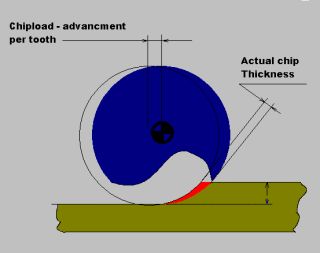
When radial cutter engagement with the material is smaller than the radius of the tool an interesting thing happens. Chip load- the distance the tool advances per cutter revolution per tooth- does not equal the actual chip thickness anymore. Chip thinning mainly happens at radial engagements below 30% of the diameter.
Radial Engagement vs chip thinning factor
100%
1.0
50%
1.0
30%
1.091
25%
1.212
20%
1.641
15%
2.1
10%
4.375
5%
6.882
In order to get compensated chipload you need to multiply recommended by manufacturer chipload by the chip thinning factor.
Usual Radial Engagement for HSM toolpaths however is between 5 and 15%.
Axial depth of cut varies depending on geometry, but
You may freely reproduce information presented herein without any consent from me, provided you include link to this site. In case when i am not the copyright holder, you may want to contact proper owner of material. Anyway, they are freely available on the Internet. If you hold the copyright right for any of the materials on this site and want them removed, please contact me here



 Tap
Tap
 Tap hole parameters
 Hello guys,
 NOTE. THIS INTEGRATION MECHANISM HAS BEEN DEPRECIATED AND REMOVED FROM HSMADVISOR.
 even if application does not merit that