

Subscribe to Blog
Email Address
 
Search for MAc returned 130 results.
Pages:(13) 1 2 3 4 5 6 7 8 [9] 10 11 12 13

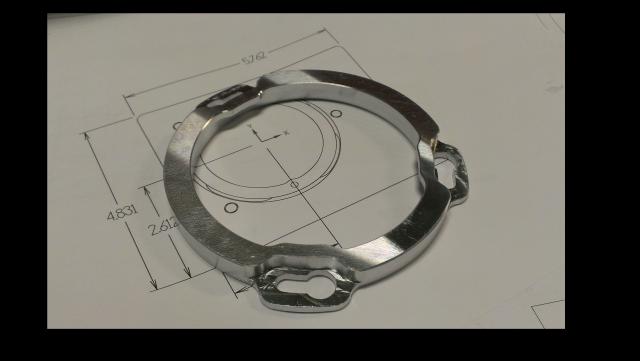
Successful High Speed Machining (HSM) Stainless Steel Part

November 28, 2014, 9:54 pm by Eldar Gerfanov (Admin)

A couple of days ago I helped a gentleman by answering a few questions about using HSMAdvisor Speed and Feed Calculator to machine a 310 Stainless Steel piece using HSM techniques.

Today he created a post on PracticalMachinist forums walking us through his experience.
And he even took a video of the part being cut!

Quote:KROVVAX
I would also like to say thanks to zero_divide for the help he gave me with the speed/feed and after using is HSMadvisor i suggest to everyone to give it a try its really worth it.

Endorsements like this is the best thing any software developer can hope for.

I always welcome any feedback regarding my software and never mind helping anyone, whether he is a novice, experienced machinist, my customer or not.

Thank you Sebastien, good luck to you!


HSMAdvisor v0.950

November 10, 2014, 9:48 pm by Eldar Gerfanov (Admin)

I have just uploaded the latest version of HSMAdvisor

In this one I made some changes (again) to the layout of the FSWizard tab.

Changes were made according to Your feedback, so i hope you guys like it!

As you can see from the screen shot above Tool Type selection drop-down lists have been moved to the Tool Data panel.
This was made to make it more obvious which values get saved and loaded when user does operations with saved tools.

For the same purpose Saved Cut drop-down is now located on top of all cut parameters that it affects.

The top-most panel (Workpiece) now contains Machine and Tool Library drop-down lists.

I urge everybody to download this update as it fixes all of the existing issues regarding layout changes.

Also in the previous version, when Trial version gets expired, the Splash Screen blocks the License Activation dialog, which would make it impossible to purchase a license or enter your license information.

This glitch and many others have been fixed and i would like to ask everybody to download the latest release as soon as possible!

Cheers!

Fancy Skin Work in Vise

October 29, 2014, 8:41 pm by Eldar Gerfanov (Admin)


There is more than one way to skin a cat!

Previously i have showed how to machine multiple pieces out of a flat plate holding only on to 0.010" thick material on the outside of the part. (here)

But there is more than one way to do it.

Sometimes your part is so hard to hold, that using tabs or skin is the best, or even the only way of machining something.

Very often, working in prototyping, I have to make only one single part and designing and producing special fixturing is also not feasible.

Here is how you can easily machine a difficult-to-hold part from both sides without using a separate fixture:

Setup: Put or part in vise. Make sure to square off at least two sides contacting the jaws for accurate positioning and minimum distortion.

Program part normally. Perform as many operations on the first side as possible.

When machining outside profile, machine to the exact depth of your part.

Here is how your part might look after completing the first OP:Read More 

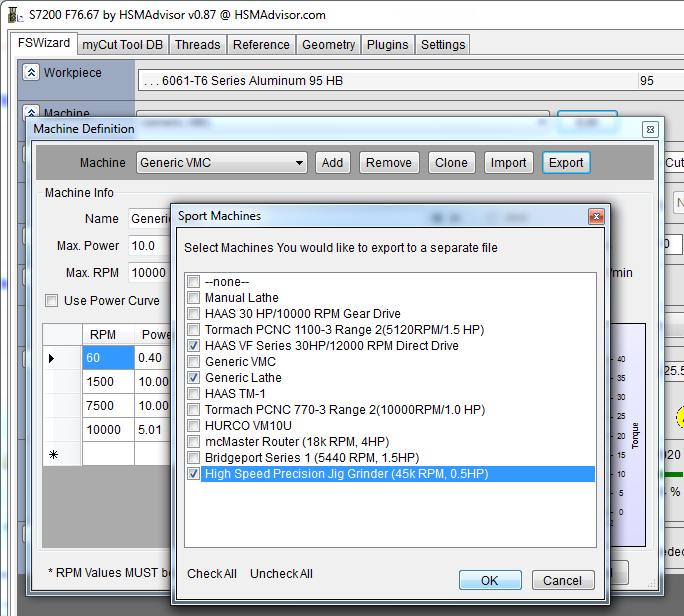
Exporting/Importing Machine Definitions to and from HSMAdvisor

September 19, 2014, 10:23 pm by Eldar Gerfanov (Admin)

In the latest update to HSMAdvisor i have added Machine Definition Import and Export.

To bring a new machine in to the active machine list

  • Click on "Edit" button next to machine list on FSWizard screen
    Machine Definition manager opens up and there you click on "Import" button.
  • A standard windows file-open dialog appears prompting you to select a file that contains the machine you wish to import.
  • After selecting a file and pressing OK, you will be asked to choose which machine you would like to import from the file.
    This is necessary as each file may contain many definitions.

To Export a machine or many to an outside file

(to share it with your friends, coworkers, or maybe even me)

  • Click on "Edit" button next to machine list on FSWizard screen
    Machine Definition manager opens up and there you click on "Export" button.
  • A dialog appears where you are prompted to choose which machines from your current list you would like to export.
  • After choosing your machines, click OK and select a file where you would like to save your machine list.

I know you guys have created your own machines for your self.

If you could use this new feature and send me your machines, that would be super sweet!

You can also upload them onto our support forums by creating a thread.
If there will be enough interest i will create a forum sub-category where users would be able to share their machines with each other.

A little "Personal Touch" - i made a typo in the Export Machines window' title!

HSMAdvisor v0.862

September 14, 2014, 4:09 pm by Eldar Gerfanov (Admin)

This weekend was very productive

I have finished work on floating license scheme and volunteers have begun testing it.

Licensing like that requires a lot of work on both the web side AND the client side. So a lot of things can go wrong and hopefully testing exposes all of the possible problems before a paying customer has the opportunity to face any.

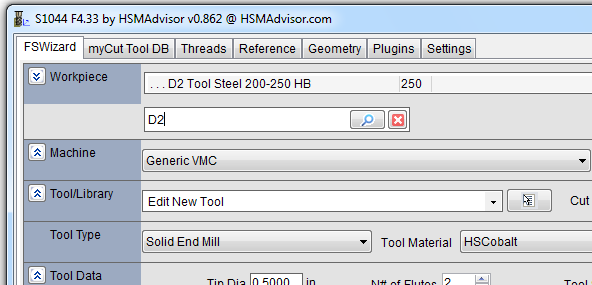
Aside from cleanup here and there i have added the material search feature.

"Material" panel is now expandable and it is hiding a search field.
When you type anything into that field, material list right above will filter out items that contain the text being searched.
To clear search results user can just click the red x button to the right of the search field.

Here is how it looks:

You don't really need to click on the magnifying glass button as searing and selecting of material is done in real time as you type text.

In fact in many cases simply typing things like "D2" will select the material you need.

What's New:

  • Material Search Feature
  • Added several new machine profiles to the default machine list
    (When you install over existing installation, use machine import function to add them to your current machine list)
  • Finished floating license module (pending testing)

What's improved:

  • Added Aluminum 6061-T4 to materials list
  • Fixed missing Aluminum 6061-T6
  • Added floating pop-up box to pretty much all fields on the FSWizard screen
  • Cleaned up various things.

Another Week left on this sale! What's to come?

July 27, 2014, 10:42 pm by Eldar Gerfanov (Admin)

The current "15% Off HSMAdvisor" sale will run until August 4th.

Which here in Ontario is a statutory holiday.

I am not really sure what we are celebrating, but hey, as long as i get paid for staying at home, i don't care.

Just wanted to thank everyone for great support, for investing into YOUR software and for telling your friends and colleagues about it.

I strongly believe our pricing and conditions are VERY competitive and more and more of you agree with me on that every day. I am not even talking about the part that should You need anything improved, fixed or questions answered, i am always available.

I also wanted to let you in in what is coming regarding HSMAdvisor Speed and Feed software.

  • The next course of action for me will be adding surface finish calculators to the FSWizard page.
    I have received a few requests for that, and about to start rolling those out.
  • I will revisit myCut DB page.
    Tool database will have filters, that would allow users to only see the tools they need.
    You will be able to choose what tool table columns you want to see.
    I will add tool manager window that will allow to quickly show which tools need to be ordered. And create a purchase order right on the spot. Which you would be able to either export to excel, Word or just print out right away.
  • I am still bearing the idea of a so-called group knowledge.
    I am not going to discuss what exactly i am thinking about. But this, if implemented would radically improve decision-making when it comes to machining.
    This last part is going to be the hardest one and involve great deal of plain hard work, so i am going to put it on a back-burner for now.

As you see we have lots more to come. And we are not even on to version 1.0 !

And the best part is, if you pitch in now, you will be able to enjoy all the updates and features i am talking about for free!

Take care.

Have a save work week!

HSMAdvisor MidSummer Sale!

July 14, 2014, 9:32 pm by Eldar Gerfanov (Admin)

For a limited time purchase any HSMAdvisor license at more than 15% discount.

We hadn't had a sale in quite a while, so i thnik it is time for one more to mark.....eh.. the very middle of the Summer!

It is July 15, and i just realized we are past half-way point and it is not long before summer is over.

Invest into software that takes "guess" out of your machine shop work!

Be Lazy (In a Good Way)

May 18, 2014, 10:53 am by Eldar Gerfanov (Admin)

I sometimes get email letters from beginning CNC machinists thanking me for making the FSWizard Online Speed and Feed Calculator available for free and asking for some tips and hints.

I always answer and try to encourage people.

Looking at my own CNC career I realize that the thing that is making me successful in my eyes is my own laziness.

Because of how lazy I am I always try to make things the fastest and easiest way possible.

At my previous day job I earned several awards for improving various processes many times saving the company thousands of dollars and many man-hours as a result.

So the main advice I have for those willing to advance is "be lazy"

Always try to improve on your work and make things work faster and better, so you do not have to work hard. If you are successful, your boss will notice.

Bill Gates - the founder of Microsoft once said that he would always give the hard jobs to lazy people, because they always manage to find ways to do them easy.

One of the awards i received 14004253161250.jpg

HSMAdvisor UI Survey Results

May 7, 2014, 9:23 pm by Eldar Gerfanov (Admin)

I think it is time to reflect on latest changes to our HSMAdvisor and look at survey results.

Thanks to your input I was able to make changes that I believe addressed some of the issues you guys were having.

You can download and try HSMAdvisor for 30 more days here http://hsmadvisor.com/index.php?page=Download

This update resets your trial counter back to "30 days left", so if your old trial expired, you can use it for one month more.

First of all, I put all of the available overrides on plain sight. Now you do not need to expand a panel to access speed/feed overrides.

I also added cutting speed and chipload to the collapsed view.

Machine Panel now has  Max RPM on collapsed view.

Gages panel now is not expandable and has Read More 

HSMAdvisor v0.775 .Net4.0 Update

April 18, 2014, 10:04 pm by Eldar Gerfanov (Admin)

Up to now people who wanted to use HSMAdvisor Speed and Feed Calculator on their Windows 8 machines had to install .Net Framework 2.0

I have decided from this point on to supply HSMAdvisor in both .Net versions.

As much as i would like to move completely to 4.0, too many people still run archaic versions of .NET framework.

I also fixed quite a few other things in this update.
So, if something looked wird before, it now should be fixed.

Edit: I have added a fix for metric taps in version 0.777

Pages:(13) 1 2 3 4 5 6 7 8 [9] 10 11 12 13
Sing In

© 2009-2022 Eldar Gerfanov. All Rights Reserved.
© 2009 Eldar Gerfanov. Materials on this site are presented as is and are mostly for educational use.

You may freely reproduce information presented herein without any consent from me, provided you include link to this site.
In case when i am not the copyright holder, you may want to contact proper owner of material. Anyway, they are freely available on the Internet.
If you hold the copyright right for any of the materials on this site and want them removed, please contact me here