

Subscribe to Blog
Email Address
 
Search for speed and feed returned 98 results.
Pages:(10) 1 [2] 3 4 5 6 7 8 9 10

Cautionary tale about Retention Knobs

December 19, 2017, 9:05 am by Eldar Gerfanov (Admin)
IMG-0878.jpg

I came across a very educational post on Practical Machinist.

The topic-starter used over-aggressive speeds and feeds for his tiny BT30-taper machine and the retention knob (a.k.a Pull Stud) snapped causing the holder to drop lower, disengage from drive lugs and mess up the spindle bore in the process.

Just in case you don't know. Retention Knob looks like this and is used to pull the tool holder in to the spindle bore, thus holding it in place:
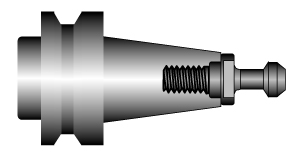
(Retention knob is the detail on the right)

This whole article is to remind everyone the importance of proper tool holder and retention knob maintenance.

Retention Knob Tips

  • Retention knobs (according to HAAS) have service life of about 6000-8000 hours.
    That means that if a tool holder is used 3 hours a day, you should replace the knob after 8 years in service.
    For smaller BT30 knobs, you should probably replace them every 4 years.
  • Retention knobs should be lightly oiled or greased (if TSC is used) once a month to lubricate the draw bar.
  • There should be no visible damage or rust on the knobs.
  • Do not exceed the maximum cutting force recommended by your machine manufacturer.
    Some of those high-helix end mills create large down-force that could in certain cases cause the knob to snap!
  • Also retention knobs should be torqued to manufacturer specs and the tightness should be regularly checked. Overtightened knobs may lead to taper of the tool deforming and causing uneven contact with the spindle bore.

Tool Holder Maintenance Tips

  • Keep Tool Holders clean. Especially the taper part that is matching to the spindle bore.
    Wipe them with a clean cloth. 
  • Do not use sand paper to clean tool holders! Soft Scotch-brite is acceptable to clean very dirty ones.
  • Repair dings and notches on the taper.
    Even an aluminum chip will cause a ding, that will create a high spot around it.
  • Replace worn-out tool holders with new ones.
    Signs of ageing is uneven contact with the spindle bore and fretting (blackening of taper in certain spots)
  • It is also a good idea to re-grind the spindle as well when replacing the tool holders - there are lot's of services that do that for very reasonable price.
  • Like wise when a new machine is purchased, only new holders and retention knobs should be used. Using old worn out holders on a new spindle bore will lead to its premature wear and even damage.

Those are all the things I could think of at the moment.
Let me know if there is anything missing.

Have a safe and productive week!
New Educational HSMAdvisor Licenses

October 18, 2017, 5:01 pm by Eldar Gerfanov (Admin)
IMAG1296.jpg

Ever since we stopped offering free educational licenses, there has been steady demand for either free or discounted license options for colleges and schools.

We could not give out free licenses any longer because they still cost money in hosting and support. 

So today after a lot of consideration we decided  to start offering special Educational HSMAdvisor License Package 

Read More 

HSMAdvisor v1.515

October 1, 2017, 5:57 pm by Eldar Gerfanov (Admin)

I have done quite some work on HSMAdvisor in the last couple of weeks.

Let's just cover real quick the new things in this update.

Read More 

New Functionality in Online FSWizard

September 5, 2017, 8:41 pm by Eldar Gerfanov (Admin)

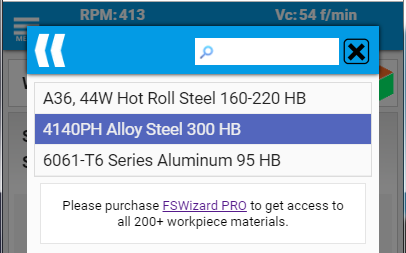
As you might have noticed, our FSWizard.com Online Speed and Feed Calculator has a limit of just 3 workpiece materials.

But if you are our customer you can get access to all the latest materials using your FSWizard login details.
Just go to Menu->Settings->Customer Login and enter your First name, Last name and email.

Read More 

HSMAdvisor has more materials and better tool deflection model!

August 7, 2017, 4:36 pm by Eldar Gerfanov (Admin)

Better Material Cross Reference

Yes you can now use HSMAdvisor with non-US/UNS material standards!

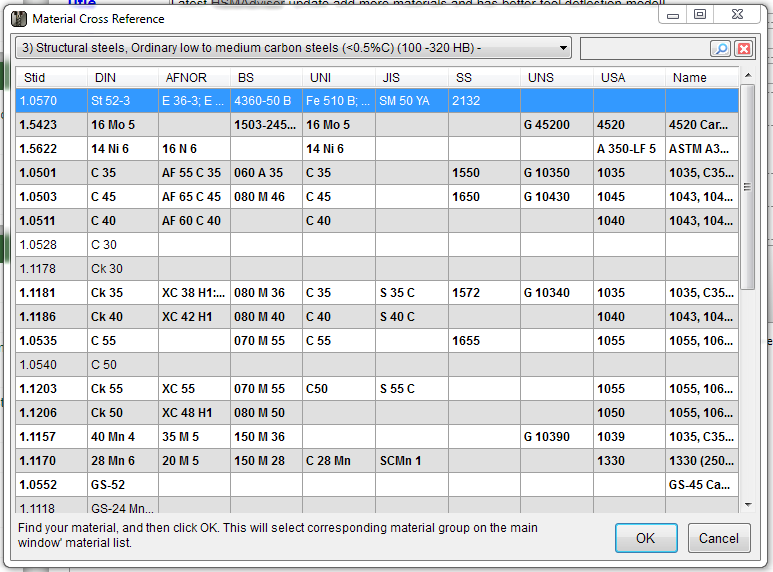
Our users have asked for better integration between HSMAdvisor's built-in Materials library and the thing called Cross Reference table and finally here it is!

Now when you click on the "More" button next to the "Material" drop-down list...

... the updated Material Cross Reference dialog appears.

Read More 

A Total Guide into Plunging and Ramping

April 4, 2017, 7:33 pm by Eldar Gerfanov (Admin)

Before we start milling away our stock we first need to get down to the required depth.

This is not a problem with external features when we can plunge outside.

When machining closed pockets, however, we need to find a way to get down to the machining depth first.

As usual there are several ways to get the job done. The plunging methods listed here are not ordered by their preference.

For various machining operations on different materials some may be more preferable than others.

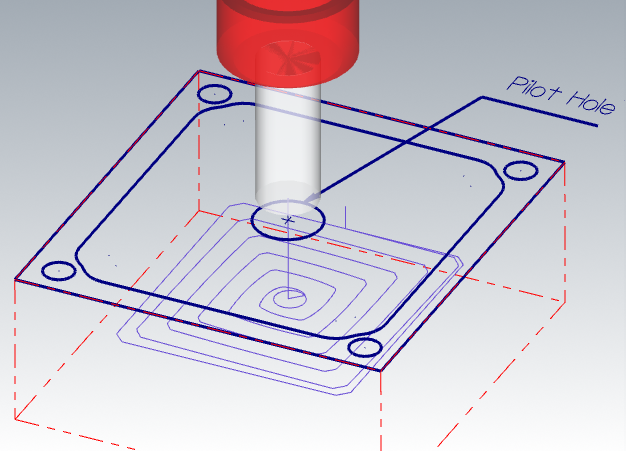
Straight Plunging into a larger Pre-Drilled hole

This is one the best ones in my opinion.
Very few machining modes can compete in effectiveness with drilling and this method will get you the best combined tool life on most materials and (in case of many deep pockets) the least machining time, even when tool change time is factored in.

Read More 

HSMAdvisor v1.506

February 27, 2017, 12:27 am by Eldar Gerfanov (Admin)

What is new in this update:

  • Improved Engraving and Chamfering speeds and feeds
  • Improved Deflection calculation for High Feed Endmills
  • Removed annoying "Ding" sound on ENTER key press
  • Some minor bug fixes and cleanup.

There have been lots of new functionality in the program and i am going to release a video showcasing that soon.
Keep an eye out for it!

Best Regards.

HSMAdvisor v1.505

February 16, 2017, 11:07 pm by Eldar Gerfanov (Admin)
aHR0cHM6Ly9oc21hZHZpc29yLmNvbS91cGxvYWRzL0NhcHR1cmVfQ3VzdG9tU0YuUE5HMTIweDgw.jpg

What is new and improved in this update:

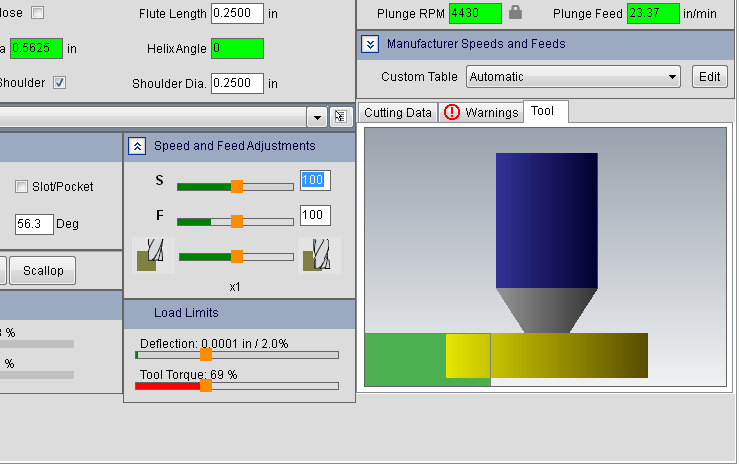
  • Added Custom Speeds and Feeds Tables selection on the Speeds and Feeds page
    You can now quickly apply custom settings to all tools in one click
  • Materials that have custom Speeds and Feeds specified for them are now highlighted with green color in the drop-down
  • Redesigned Custom Speeds and Feeds module.
    It is now on a separate dialog and is accessible not only through Edit Tool Dialog, but also from Speeds and Feeds page by clicking on "Custom Tables" Edit button.
    Dialog now uses Result "in/mm" setting for displaying default units.
  • Fixed error on adding a Tool Library from Database Actions drop-down
  • Improved layout drawing and resizing speed.
  • Improved cut balancing for End Mills

As usual the latest update can be downloaded over here: http://hsmadvisor.com/?page=HSMAdvisor

Improved FSWizard is coming!

January 23, 2017, 12:41 am by Eldar Gerfanov (Admin)

Check this out, guys.

Been working on this for the past couple of weeks:

New FSWizard Speeds and Feeds Calc will have not only modern improved design. But latest tools and materials.
Special attention is being paid to have it produce EXACTLY the same results as our HSMAdvisor desktop app.

It is not complete yet, but it is almost there - making it catch up to the latest HSMAdvisor code is a big job.

The new calculator will replace our online calculator as well.....

Yes, you heard that right! You will be able to run exactly the same FSWizard Speed and Feed calc on your mobile phone, desktop and even Windows Mobile.

Heck, it will even work on Mac!

Best of all, it will be published as an update to our existing apps, so our existing customers will not have to buy an upgrade, unlike what some other "Machinist Calculator" has done in the past.

I will keep you posted.

Cheers!

HSMAdvisor status report

January 16, 2017, 9:05 am by Eldar Gerfanov (Admin)

Hello everybody!

I have not made many blog posts here lately because i have been working a lot on new features and simply did not have much time for anything.
So I decided i'd make a little report on how we are doing and where the project is.

First things first.

I just released an update to HSMAdvisor v1.503

  • Drilling tools now consider Shank Diameter when calculating maximum allowed torque on the tool.
    This will lead to more safety when using, say 1" tool with a 0.5" shank.
  • Thread Milling tools have been immensely improved.
    Shank diameter is now included into the calculations.
    Default Length is now 2.5 diameters
    Improved suggested cutting speeds and feeds

Our Multiple Language Translation Program is chugging along nicely

Several people messaged me about intentions to build translations so far.

At this point we have people working on translations for the following languages:

  • Croatian
  • Serbian
  • Portuguese
  • Perhaps Polish (I see someone uploading translations, but the person have not contacted me about it)

Mobile FSWizard app is due for major improvements

Major visual re-design is under way and we are working on making FSWizard Mobile accessible on more devices in more ways.
It is going to be a fully fledged WEB app, that can be run on any internet-connected device. Even on a desktop.

Integration with HSMAdvisor Machine Profiles and Tool Libraries is also planned.

Perhaps we are going to drop native support for Google Play and iOS stores. I am sick of them charging us 30% for their services.

Pages:(10) 1 [2] 3 4 5 6 7 8 9 10
Sing In

© 2009-2022 Eldar Gerfanov. All Rights Reserved.
© 2009 Eldar Gerfanov. Materials on this site are presented as is and are mostly for educational use.

You may freely reproduce information presented herein without any consent from me, provided you include link to this site.
In case when i am not the copyright holder, you may want to contact proper owner of material. Anyway, they are freely available on the Internet.
If you hold the copyright right for any of the materials on this site and want them removed, please contact me here