

Subscribe to Blog
Email Address
 
Search for hsmadvisor update returned 104 results.

HSMAdvisor 1.301 Released!

May 28, 2016, 2:31 am by Eldar Gerfanov (Admin)
limits.png

There had not been any updates to HSMAdvisor for several months now.
And there is a very good reason for that.

We have been working hard on a lot of new super-cool features and improving the old functionality.

BTW: This Update Resets the Trial Counter!

Let us cut to the chase.
Here is a list of all the latest changes and improvements:

  • New Cut Cloud controls added (beta only!)
  • New Cast Aluminum materials
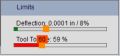
  • New combined Tool Torque and Deflection Limit controls
  • New and Improved Tool Display Graphics. Now for Turning too!
  • Lathe Tools now consider Shank size when suggesting chip-load.
  • New Mass Edit - > Set SFM/Feed Overrides command in the Tool Database
  • Improved Tool Deflection calculations
  • Improved and refined a lot of behind-the-scenes stuff

I am going to explain the most important improvements below.

Read More 

HSMAdvisor is moving to the Rolling Release model

April 22, 2016, 12:33 am by Eldar Gerfanov (Admin)
Capture_prices.PNG

From this point on, all holders of valid HSMAdvisor licenses will be eligible to free Life-Time updates and upgrades to their HSMAdvisor product.
Likewise there is not going to be a big functionality jump between the version 1.99 and 2.0 like in some other software products.

This release model is called "rolling release" and it is becoming the new industry norm.
It offers smoother transition and no steep learning curve for existing users. It also helps prevent unavoidable bugs when a large amount of changes is introduced all at once.

Read More 

HSMAdvisor Easter Sale!

March 25, 2016, 1:24 am by Eldar Gerfanov (Admin)
easteregg.png

Let us kick off the first HSMAdvisor sale of 2016!

Until April 1st save 15% on all HSMAdvisor purchases over $90

You can buy a 3 year subscription for $82
A Lifetime Subscription for just $165

Offer is combinable with our standard 30% multiple seat discount!

So, you can save even when buying the 2 seats of one year subscription.

Check our web store for updated pricing: http://hsmadvisor.com/index.php?page=buy

Happy Easter and have a Good Long Weeken

The New Help Category: Tool Database & Inventory

February 25, 2016, 3:41 am by Eldar Gerfanov (Admin)
ToolDatabaseTabAnnotated.PNG

Being as vast and as complex as it is HSMAdvisor Tool Database may seem overwhelming for many users despite all the benefits of using it.

To address this issue I have just added a new category to our HSMAdvisor on-line Help resource called Tool Database & Tool Inventory

Here is a the opening article of that category:

Quote:

An integral part of HSMAdvisor is its very powerful Tool and Cut Database also known as Tool Database

Tool Database allows you to not only store your tools in one convenient location sparing you the time needed to key-in your tool type, size etc.
It is very extensible and since its inception has grown both in size and functionality.

With every update the list of its features keeps growing and at present it can (among many other things) do the following:

  • Store and Edit geometric Tool data, Including automatic creation of tool data from a sample tool entry.
  • Store/Create/Manage Custom Tool Manufacturer Cutting data using Manufacturer Brand/Series names
  • Store and Manage Tool Handling data like: Number of Tools in stock, Ordering Vendor Information, Physical location in the shop
  • Set up Low Tool Stock warning levels and add tools, that are low on stock to a Request List to be ordered.
  • Create and Export customizable Tool Request Orders for use in purchasing.
  • Restock received tools into the Tool Database
  • Attach Cutting Data (Known as just "Cuts") to tools for various cutting scenarios in different materials.
  • Store complete MasterCAM Tool and ToolPath parameters for easy importing/Exporting of MC operations
  • Organize Tools into Libraries
  • Share a single Tool Database between many HSMAdvisor seats in real-time.

 In the following articles we will describe the main functions of the Tool Database

In all there are 5 articles in there already describing many of its functions in detail.
Please check them out if you are not sure what the Tool Database does and how to use it.

And as always: when in doubt - ASK :)


HSMAdvisor v1.217

February 16, 2016, 1:33 am by Eldar Gerfanov (Admin)
DBStatusOK.png

We have just released a pretty important HSMAdvisor v1.217 update!

I strongly encourage everybody to go ahead and install it as it contains some big improvements.

What is new and improved in this update:

  • New Tool Database Status Indicator:
    Status Bar Indicator showing whether the Database file is being written, up to date or if write has failed
  • A Warning now shows up when HSMAdvisor is closed with DB changes not saved.
  • Now you can not close HSMAdvisor until Database file has been written to the disk
  • A local backup copy of Shared database is now created on each computer for cases when connection is unavailable.
  • Fixed the problem when new Tools and Cuts were not added to the shared database
  • Fixed some (./,) locale-related problems.
  • Fixed the problem of some settings not being saved.

I would like to explain one new feature here - The Tool Data Base Status indicator:

On the status bar of HSMAdvisor screen you can now see The Tool Data Base Status indicator (later DB Status) icon.

Read More 

HSMAdvisor 1.214 Hook for MaserCAM x9

January 28, 2016, 1:39 am by Eldar Gerfanov (Admin)
HSM_Rough_Pocket2.PNG

HSMAdvisor the Hook for MasterCAM x9 has had massive changes since the last update

  • Completely redone Operation Import/Export functionality
  • Added "Insert Operation" command (Add it to MasterCam toolbar through Customize->Toolbars->HSMADVISOR->select item,select toolbar-> Add..)
  • Reworked MC Toolbar Icons
  • Better tool Recognition
  • Added support for ALL milling (2d, 3d, HST) operations. 
  • Fixed a huge number of problems including those with coolant, tool numbers and some unsupported operations.


HSMAdvisor hook for MasterCAM currently supports only MC x9.

Due to large amount of work I have done on x9 hook I decided to not port it to support x8. I simply have no time resources to do so. I only have one life you know!

Later versions of MasterCAM will, however, be fully supported.

Machinists Spoke and We Listened

January 18, 2016, 3:49 am by Eldar Gerfanov (Admin)
HSMAv1.000_Load_Tool_DLG.PNG

Every month we are getting a good amount of feedback and suggestions.

Everything is getting prioritized and eventually implemented. Urgent stuff is getting done fast. And other "nice to haves" are getting pushed down according to their usefulness / difficulty (yes, everyone secretly wishes my program could also edit and create HSM g-code :)).

It is amazing, but almost half of HSMAdvisor's features were originally suggested by our loyal users!

The latest update HSMAdvisor 1.213 addresses some of the feedback I have received last couple of months.

So the New features are:

  1. Smart Depth and Width of Cut (DOC/WOC) suggestion (user suggested)
  2. Compressing of Shared Tool DataBases
  3. Display of Stock status on Tool DataBase tables (user suggested)
  4. Various little improvements like new Heli-Coil reference, better DOC/WOC calculation better multitasking, etc. (mostly based on user feedback)

Let's go over the most important ones here:

Read More 

HSMAdvisor v1.206

November 20, 2015, 4:09 am by Eldar Gerfanov (Admin)
ViewToolsToOrder.PNG

Tool Inventory Advisor is now included into all HSMAdvisor License types!

This feature is absolutely free for HSMAdvisor customers. No special login is required. It is already built in!

Please download the latest update to enjoy the latest update!
Some video tutorials will be published this weekend.

Also in the this update:

  • Changed the look of Material and Tool drop-downs
  • Added search to Tool list drop-down
  • Uploaded new machines to the HSMAdvisor Cloud
  • Improved function of Tool Library
    Fixed small bugs
    "Shared Database" flag is now set in the database file itself

Urgent HSMAdvisor Update

October 27, 2015, 11:23 pm by Eldar Gerfanov (Admin)

A couple of things got broken after the last update, so I have just released a fix to solve the issues.

Now everything works better than ever.

Thank you to everyone for reporting the issues. I will make sure to avoid these problems next time around.

Cheers!


HSMAdvisor v1.199

October 24, 2015, 2:54 pm by Eldar Gerfanov (Admin)

This is update is the last one before a pretty big new additional feature being added to HSMAdvisor. So i cleaned up all the little glitches and made a lot of invisible to naked eye improvements.

Without going into detail i can tell you that those features normally cost users of other software products upwards of several hundred dollars, and they will not be without a cost to HSMAdvisor users too.

This feature will be optional and only those who need it will be able to purchase it as an add-on Later this feature will become a separate software product with HSMAdvisor add-on being just a small part of it.

Development of HSMAdvisor will continue as normal.


 What is new and improved in this update:

  • Improved function of Tool Tables. Removed flickering. Faster Filtering and scrolling.
  • App Icon changed
  • Modified over 45 Degree Ramping Feedrates for milling.
  • Fixed Cloud Machine Upload
Sing In

© 2009-2022 Eldar Gerfanov. All Rights Reserved.
© 2009 Eldar Gerfanov. Materials on this site are presented as is and are mostly for educational use.

You may freely reproduce information presented herein without any consent from me, provided you include link to this site.
In case when i am not the copyright holder, you may want to contact proper owner of material. Anyway, they are freely available on the Internet.
If you hold the copyright right for any of the materials on this site and want them removed, please contact me here