

Subscribe to Blog
Email Address
 
Search for feedback returned 45 results.

HSMAdvisor Integration with CADCAM
November 2, 2013, 2:53 am by Eldar Gerfanov (Admin)

NOTE. THIS INTEGRATION MECHANISM HAS BEEN DEPRECIATED AND REMOVED FROM HSMADVISOR.

PLEASE CHECK OUT OUR MASTERCAM X9 AND MASTERCAM 2017 HOOKS FOR MASTERCAM

One of the most requested features in HSMAdvisor has long been integration with various CAD/CAM solutions available on the market.

There are two possible ways of achieving said task.

First way: using CAD/CAM API to create plugins to enable HSMAdvisor to "talk to" various software packages.
This road could produce the best results, however implementing it would be laborous and results not always very convinient to use.
Also developer(me) would have to create plugins for many dozens of cad/cam software packages. Muliply that by the fact that with each CADCAM release, a new version of plugin would need to be produced, tested and debugged. This work is for a whole software department and would call for a product far more expensive than what a lot of my customers could afford.

Second way: Grab tool, speed and feed data directly from the CAD/CAM window, process it and then update required information when the calculation is done.
This solution is easyer to implement and could prove to be the most convinient for user as well.

Need i tell you that i have chosen to go the easy way?

Without further delay let me introduce the first Speed and Feed calculator that can be integrated with a CAD/CAM solution by a user himself!

This is How it Works

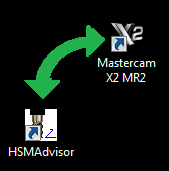
Step One: User launches CAD/CAM solution. We will use MasterCAM x2 in our case.

A toolpath is programmed the usual way, a proper tool is selected and when it is time to enter your speed and feed data you launch HSMAdvisor.

On FSWizard page you first select

Read More 
HSMAdvisor v0.601 Release

September 24, 2013, 4:07 am by Eldar Gerfanov (Admin)

I have just uploaded a new release of HSMAdvisor.

I have decided to extend trials every time major releases come out.

This will happen every several months or so.

This release is pretty big. So every one who has not purchased yet gets 30 days more to play with it.

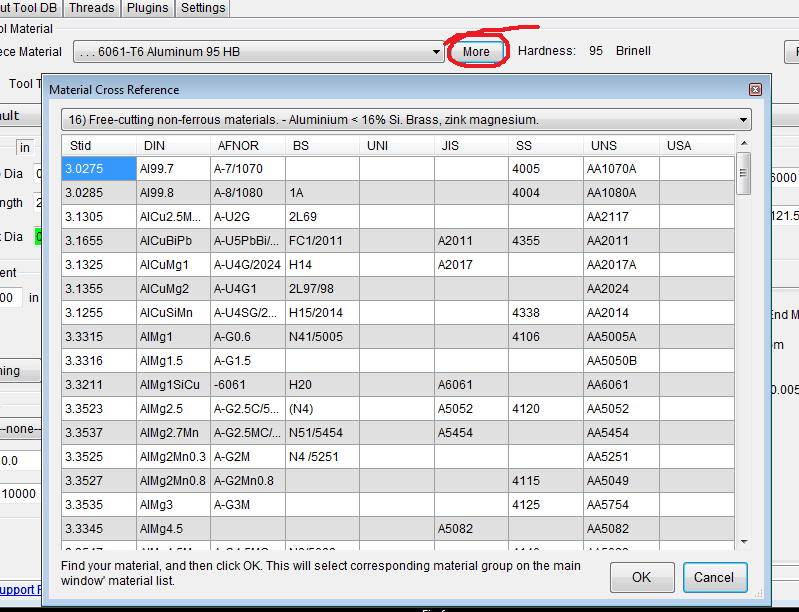
We have material cross-reference tool.

It allows you to quickly figure out material group for a large number of materials. Around 1000 of them.
You can access it by pressing "MORE" button next to material drop-down list.

Here is it looks:

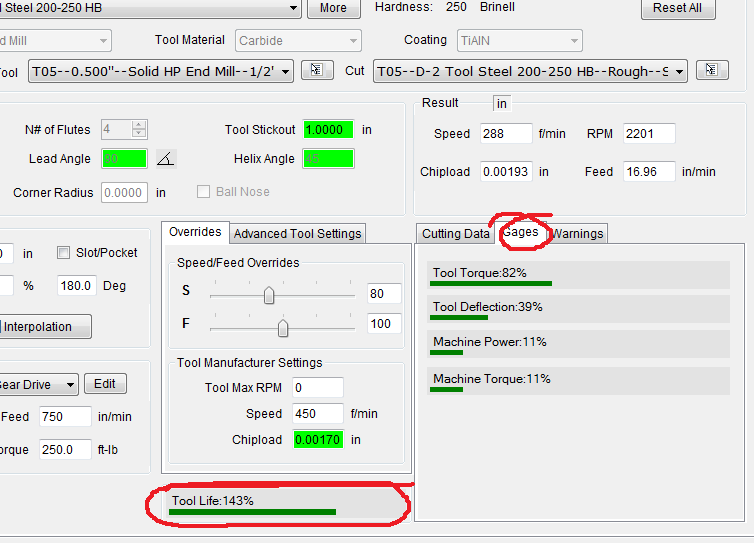
Second Big thing is new tool life estimator.

It allows to show you how tool life reacts to changes in speed, feed rate and depth of cut.

It is a percentage based on normal shoulder milling cut that should equal 100%

Nobody else has this feature- it is absolutely unique to HSMAdvisor and that is in part why i decided to extend trials this time.

Besides tool life gage there is a new tab in results area.

It is called Gages.

It shows important information like what percentage of deflection, torque and machine load we are running at the moment.

It helps to figure out at a glance if something is out of whack.

As always feedback is welcome.

Time on great HSMAdvisor deal is running out!!

August 30, 2013, 1:10 am by Eldar Gerfanov (Admin)

HSMAdvisor is going fully commercial.

After September the 1st 30th, three seat license for HSMAdvisor currently available for just 75$ will cost 249$

Here are final prices for different packages that will be available:


Basic Individual License

  • Single Seat  ___________99$
  • Three Seat   ___________249$ (15% savings over single seat)
  • Five Seat     ___________349$ (30% savings over single seat)

Special Company-Wide License

  • Unlimited number of seats within company premise ___________email Quote


Hurry UP you only have few days left!!


For the list of people whos suggestions and feedback were deemed valuable and who will get a free license please read here.


HSMAdvisor 0.023 Has been released

April 8, 2013, 3:26 am by Eldar Gerfanov (Admin)

This release is a major step forward.
We are starting to wander away from just Speeds and Feeds calculator part of the project.

Version 0.022 was a little buggy.

All reported and known bugs have been fixed.

New update version is 0.023

New features:

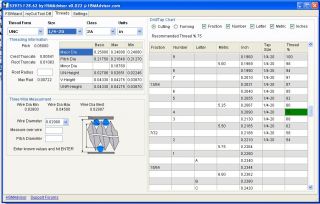
  • Threads page: You can now get thread cutting and tapping data for most popular threads in north America (UNC/UNF/ISO).
    The list of supported threads and features will grow according to necessity and user feedback.
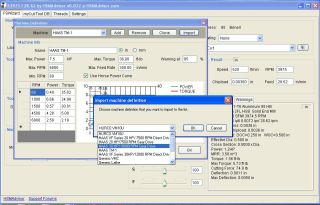
  • Machine Profiles now have 2 new buttons: Clone and Import.
    Clone button simply copies selected machine definition with a different name.
    Import button is needed to be able to update/add machine definitions from default machine list. As users modify and customize their Machine List, thay are now able to add machine definitions hassle-free from default_machines.xml file that is supplied with every update.

Bugs Fixed:

  • Sticky Ball nose check box

  • Max HP improperly rounded

Additions:

  • Thanks to Greg Jackson and Matt Doeppers from Tormach i was able to create Horse Power/RPM curves for Tormach PCNC770 and PCNC1100 models (if you install over previous version, you can use import function to add those machines to the list)

Threading threading.JPG Machine Definition Import mach_def_import.JPG

HSMAdvisor v0.017 is available for Download!

February 9, 2013, 10:55 pm by Eldar Gerfanov (Admin)

I have just released HSMAdvisor build 0.017!

First you should uninstall the previous version.
As some of the data files are not compatible with the version 0.017

After downloading and installing it you will receive another 30 days to play with my software.

New things:

  • A bunch of new materials
    Structural steels added 1035, 1045 and some other
  • Grooving turning tool added to the tool list
  • Several Tools and Cuts can now be selected at the same time and deleted or moved to a different Library
  • Double click on myCut ToolLibrary now causes the Tool/Cut to load
  • HSM Cutting speed compensation now only turns on when HSM/Chip Thinning is checked.
  • Huge number of bugs fixed.

Get it HERE ->http://hsmadvisor.com/

Enjoy and don't forget to leave your feedback.
You can do so support forums.

Unfortunately because of high number of spam messages You will have to register first (unless you already did)

Forums are located at http://zero-divide.net/index.php?page=forums&shell_id=170&category_id=1123, a simple registration on my web site (zero-divide.net, register) allows you to post your questions/feature requests/suggestions.

Need i remind you that registered users who actively participate get full version for FREE?


Sing In

© 2009-2022 Eldar Gerfanov. All Rights Reserved.
© 2009 Eldar Gerfanov. Materials on this site are presented as is and are mostly for educational use.

You may freely reproduce information presented herein without any consent from me, provided you include link to this site.
In case when i am not the copyright holder, you may want to contact proper owner of material. Anyway, they are freely available on the Internet.
If you hold the copyright right for any of the materials on this site and want them removed, please contact me here