Interation of CAM drilling operation with HSMAdvisor
This is my first try at making a tutorial.
I wanted to show how to set up integration with you CAD/CAM program usi g drilling cycle as example.
This is my first try at making a tutorial.
I wanted to show how to set up integration with you CAD/CAM program usi g drilling cycle as example.
I have decided to keep the sale on HSMAdvisor until November 11.
This should give everybody just enough time to make up their mind.
The sale has been extended until November 13 th.
I have received not one but two letters asking me what happened to the sale prices and why it ended so soon.....
Well, you guys have 2 more days to decide!
Also i have uploaded an update to HSMAdvisor that fixes problems with the integration module giving out errors.
Now everything works fine.
Please read the latest tutorial in HSMAdvisor Tutorials section here
This is a pretty Unique way of doing it.
It is still in the beta-mode.
But it is fully functional. I have tested it on MasterCAM and SurfCAM with great results.
While some functionality is not supported well on all cadcam packages, it is still much better than nothing.
Please send me your feedback on how it works with your CADCAM package.

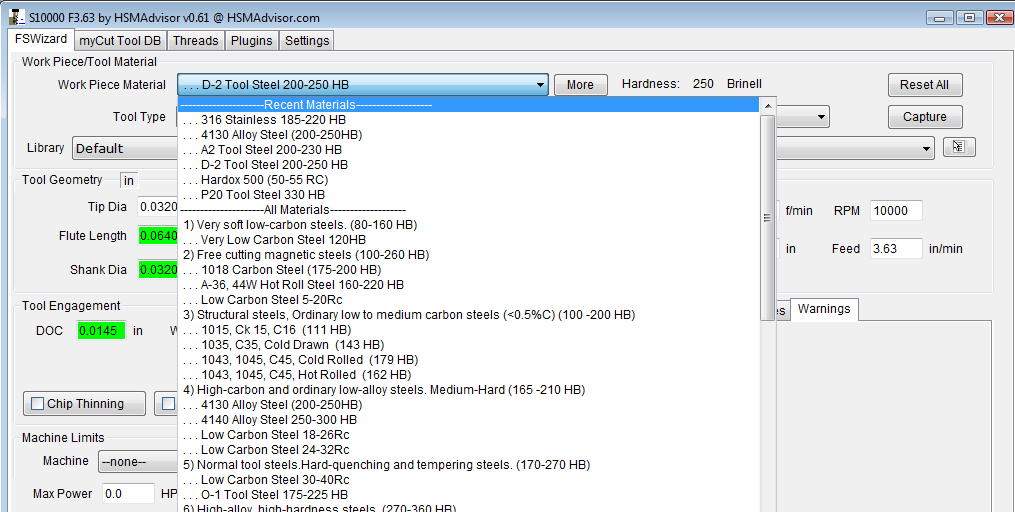
Now material list will have 6 recently used items at the very top of it.
Later on i will allow user to enter whatever number of recent items he wants to see there. But for now its just 6.
Starting from this release i have changed how Computer ID keys are generated.
This was done to fix problems some of the users experienced when they added or removed additional hardware on their computers.
New Computer ID's mean License keys have been changed for all users as well.
Not to worry though, License keys will be automatically updated for all of our users, so no action from their side is required.
If you have active license. You will get a message telling you what happened and your license file will be updated automatically.
All of them were pretty minor, nothing to write home about.
Added several materials, updated speeds and feeds for tool steels and stainless steels.
I still have to add some of the previously requested materials (like Weldox Graphite, etc) to the list.
And i am planning to add it in the next release.
Chiploads for micro-endmills (below 1/16 dia) were reduced significantly.

NOTE. THIS INTEGRATION MECHANISM HAS BEEN DEPRECIATED AND REMOVED FROM HSMADVISOR.One of the most requested features in HSMAdvisor has long been integration with various CAD/CAM solutions available on the market.

There are two possible ways of achieving said task.
First way: using CAD/CAM API to create plugins to enable HSMAdvisor to "talk to" various software packages.
This road could produce the best results, however implementing it would be laborous and results not always very convinient to use.
Also developer(me) would have to create plugins for many dozens of cad/cam software packages. Muliply that by the fact that with each CADCAM release, a new version of plugin would need to be produced, tested and debugged. This work is for a whole software department and would call for a product far more expensive than what a lot of my customers could afford.
Second way: Grab tool, speed and feed data directly from the CAD/CAM window, process it and then update required information when the calculation is done.
This solution is easyer to implement and could prove to be the most convinient for user as well.
Need i tell you that i have chosen to go the easy way?
Without further delay let me introduce the first Speed and Feed calculator that can be integrated with a CAD/CAM solution by a user himself!
Step One: User launches CAD/CAM solution. We will use MasterCAM x2 in our case.
A toolpath is programmed the usual way, a proper tool is selected and when it is time to enter your speed and feed data you launch HSMAdvisor.
On FSWizard page you first select
Read More
Haloween sale is ON!
All HSMAdvisor Licenses over $90 are currently 15% off!
You can buy a 3 Year Floating License Subscription Or a Permanent License now for just $82
Life Time Subscription is only $165 And Permanent License with LifeTime updates is $186
Cheers!
This is another video from his Productivity Series.
In there we get a quick demonstration of HSM techniques Eric is using to produce his beatiful vise.
Also my own HSMAdvisor is featured there!
Thank you Eric!
Orange Vise are produced in the USA.
Check out this website for more info http://orangevise.com
myCut Tool Database is quite a unique thing.
It not only contains all of your tools, but also each and every tool can have multiple operations or "Cuts" attached to it.
Everything is very simple.
Database contains Libraries
Libraries contain Tools
And Tools contain Cuts
Each entity behaves according to specific rules and "knows" specific kind of data.
Please read more to learn how it all works.
Read MoreI have just uploaded a new release of HSMAdvisor.
I have decided to extend trials every time major releases come out.
This will happen every several months or so.
This release is pretty big. So every one who has not purchased yet gets 30 days more to play with it.
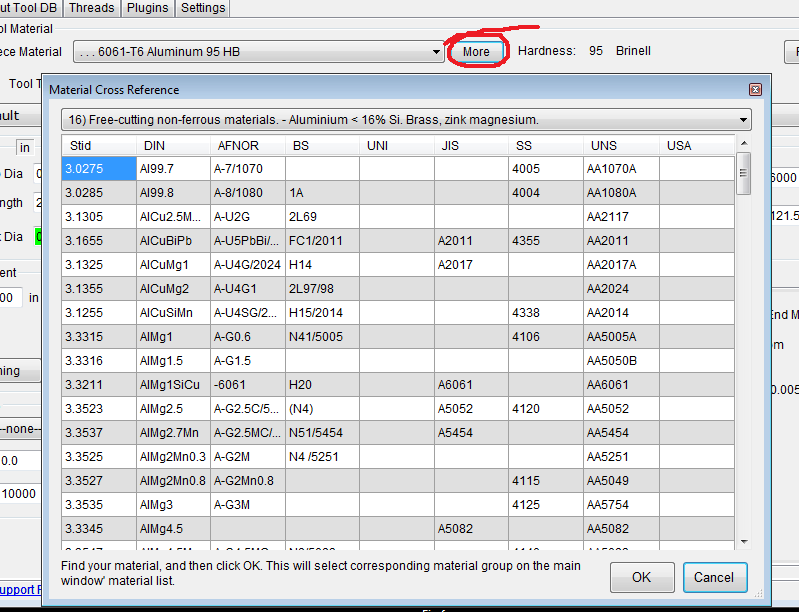
It allows you to quickly figure out material group for a large number of materials. Around 1000 of them.
You can access it by pressing "MORE" button next to material drop-down list.
Here is it looks:

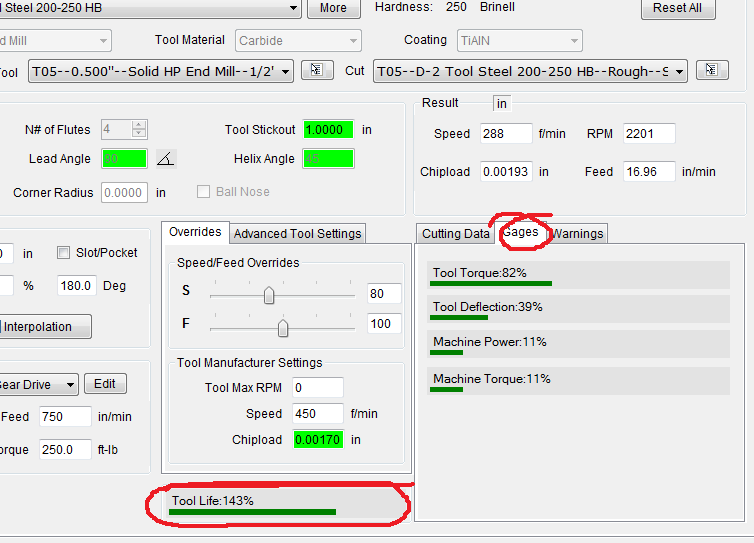
It allows to show you how tool life reacts to changes in speed, feed rate and depth of cut.
It is a percentage based on normal shoulder milling cut that should equal 100%
Nobody else has this feature- it is absolutely unique to HSMAdvisor and that is in part why i decided to extend trials this time.
Besides tool life gage there is a new tab in results area.
It is called Gages.
It shows important information like what percentage of deflection, torque and machine load we are running at the moment.
It helps to figure out at a glance if something is out of whack.

As always feedback is welcome.
I was originally going to introduce new License types on september the 1st.
But it turned out to be a little harder than i thought and everything got delayed by almost one month.
The revised date of september the 30th is still standing though.
So until then 3 seat license will still be available for 75$ and a new single seat will be available for just 49$ !!!
If you have been procrastinating, this is your time to save.
Also check out my Online store that i coded myself.
Here is a video of a 3 flute Hi-performance endmill slotting aluminum 0.75" deep per pass.
Well, not entirely slottimg, more like pocketing, but the very first move is a full width slot.
Stepover is 0.4"
First i calculated the cut on HSMAdvisor.
Used 6061 aluminum as material and HP endmill at a tool type.
Tool torque and deflection limits were both set at 100% and performance slider was at maximum.
This is what it came up with:
S9127 RPM 125 IPM.
Full slot, 0.75" deep.
45 in^3/min mrr.
Looking at how easy it went i think i should allow for more load in my calculator.
If you have not yet tried HSMAdvisor, make sure you do.
You will be amazed at how much productivity you have been missing out on.
© 2009-2022 Eldar Gerfanov. All Rights Reserved.
© 2009 Eldar Gerfanov. Materials on this site are presented as is and are mostly for educational use.
You may freely reproduce information presented herein without any consent from me, provided you include link to this site.
In case when i am not the copyright holder, you may want to contact proper owner of material. Anyway, they are freely available on the Internet.
If you hold the copyright right for any of the materials on this site and want them removed, please contact me here